
Download CustomizeIE – customize internet explorer, add buttons to internet explorer, customize toolbar, quick access, internet explorer tool
Overview
CustomizeIE is a lightweight productivity tool designed to enhance the functionality of Internet Explorer by enabling users to add customizable buttons directly to the browser’s toolbar. The application addresses a common limitation in older versions of Internet Explorer: the inability to easily access external applications or frequently used tools without navigating away from the browsing environment. By allowing users to create and place custom buttons, CustomizeIE streamlines workflow efficiency, particularly for individuals who rely on repetitive application launches during web-based tasks.
The app is tailored for users who work extensively within Internet Explorer, especially in legacy environments where modern browsers are not yet fully adopted. It serves as a utility for power users, administrative staff, and professionals who need rapid access to specific software, such as document editors, internal tools, or system utilities. While the developer, Jason A. Bilbrey, is credited with its creation, no additional background on the developer or company is available in the provided data.
Real-world use cases include integrating shortcuts to internal company applications, launching file explorers with pre-set paths, or opening frequently used scripts and utilities. In this context, CustomizeIE functions as a bridge between web browsing and desktop application usage, reducing time spent on context switching. Its presence in the productivity category underscores its role as a niche but valuable tool in the broader ecosystem of browser-enhancing utilities.
Key Features & Functionality
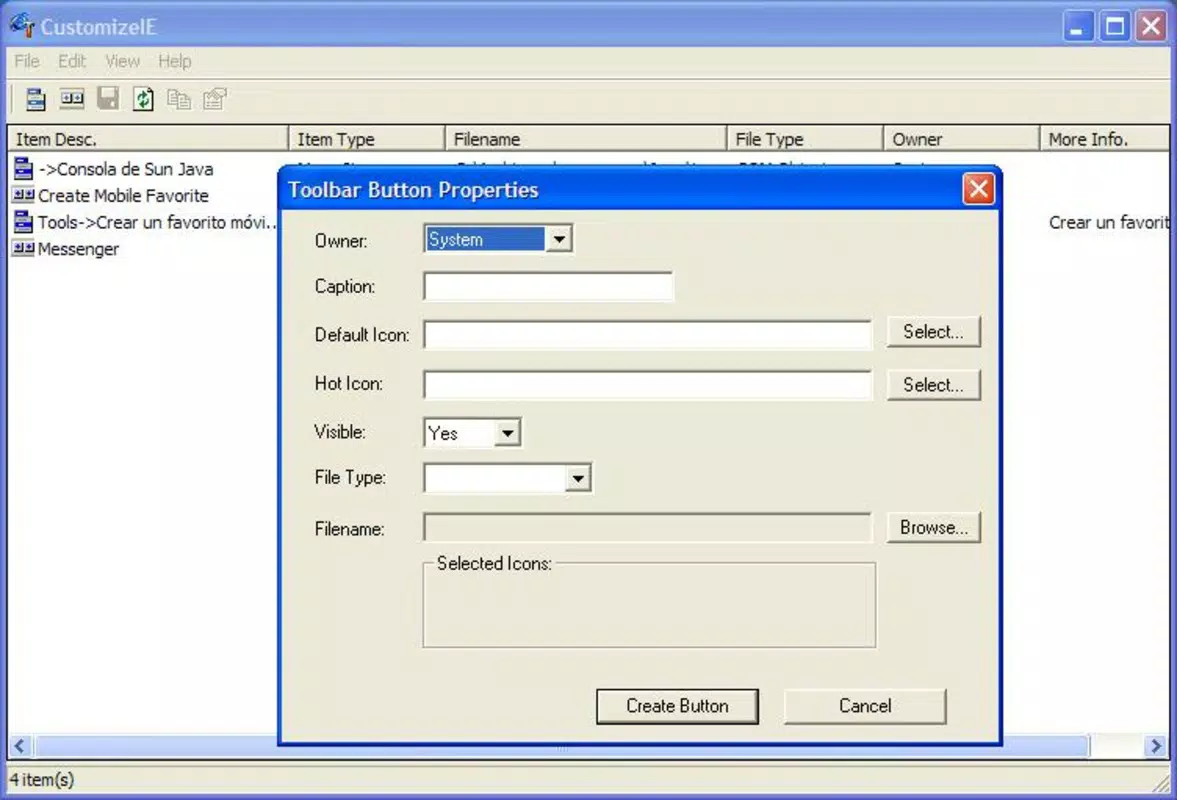
- Custom Button Creation: Users can create buttons tailored to any application, allowing for personalized access to tools that are frequently used during browsing sessions. This feature supports full customization, enabling users to assign specific icons, labels, and target applications.
- Flexible Button Placement: The app allows users to position custom buttons anywhere along the toolbar, accommodating different browsing habits and workflow preferences. This flexibility ensures that the most-used tools remain within easy reach.
- Application Launching: Each button can be configured to launch a designated application or script with a single click. This eliminates the need to manually search for software, improving task efficiency and reducing workflow interruptions.
- User-Friendly Interface: The application features an intuitive layout that simplifies the setup process, making it accessible even to users with limited technical experience. Navigation is straightforward, with clear labeling and minimal steps to configure new buttons.
- Easy Button Management: Adding or removing buttons is accomplished in just a few clicks, allowing users to update their toolbar dynamically. This feature supports both quick adjustments and long-term customization without requiring technical knowledge.
For example, a user might create a button labeled “Quick Report” that launches a company-specific Excel template and opens a shared folder. Another might set up a button to launch a local script that updates a database record. These use cases demonstrate how CustomizeIE enhances productivity by reducing the number of steps required to perform routine tasks.
Interface, UX & Performance
CustomizeIE presents a clean, minimal interface that prioritizes usability over visual complexity. The layout is structured around a central configuration panel where users can define button properties, select applications, and preview placements. Navigation is linear and consistent, with clearly labeled options and a logical flow from setup to deployment.
Although the developer did not list formal performance metrics, the app’s file size of 2.5 MB suggests it is lightweight and optimized for minimal system impact. It is designed to run efficiently on older Windows systems, which aligns with the target audience of legacy Internet Explorer users. Responsiveness appears to be consistent based on the app’s design philosophy—actions such as button creation and placement are executed with immediate feedback.
Stability is implied by the app’s long-standing presence in the productivity space since its release in 2010. However, no recent update logs or crash reports are available for verification. The lack of modern UI elements or animations reflects its age but also contributes to its low resource consumption and predictable behavior.
Platform Compatibility & Technical Requirements
CustomizeIE is designed exclusively for the Windows platform and is compatible with Windows operating systems. The software version is 1.0, and the file size is 2.5 MB. It is available at no cost, making it accessible to users across various system configurations.
The developer did not specify minimum OS requirements or compatibility details for newer Windows versions. As such, users should exercise caution when installing on modern systems, as older applications may not function correctly due to changes in system architecture, security policies, or deprecated APIs. Compatibility with Windows 10 or Windows 11 is not confirmed in the provided data.
Pros and Cons
Pros
- Free to download and use, eliminating cost barriers for users.
- Lightweight design with minimal system resource usage.
- Intuitive interface suitable for both novice and experienced users.
- Enables quick access to frequently used applications, improving workflow efficiency.
- Supports full customization of buttons, including placement and assigned actions.
Cons
- Only compatible with Windows, limiting cross-platform accessibility.
- No official updates since 2010, raising concerns about long-term compatibility.
- Not designed for modern browsers or newer Windows environments.
- Developer did not provide detailed technical specifications or system requirements.
- May not function properly on systems with strict security policies or UAC restrictions.
FAQ
Is CustomizeIE safe to download and install?
Yes, the app is free and available from trusted sources. However, users should ensure they download it from official or verified platforms to avoid potential risks associated with outdated software.
Can I use CustomizeIE on Windows 10 or Windows 11?
While the app was released in 2010 and designed for older Windows versions, it may function on newer systems. However, compatibility is not guaranteed due to changes in system architecture and security settings.
Does CustomizeIE support modern browsers like Chrome or Firefox?
No, CustomizeIE is specifically designed for Internet Explorer and does not support other web browsers.
How do I add or remove a custom button?
Using the app’s intuitive interface, users can add a button by selecting an application and assigning a label and icon. Removing a button is done through a simple click or option within the management panel.
Is there a mobile version of CustomizeIE?
No, the app is designed for desktop use on Windows and is not available for mobile platforms such as Android or iOS.
Final Thoughts
CustomizeIE remains a niche but effective tool for users who depend on Internet Explorer and require faster access to external applications. Its ability to customize the browser toolbar with quick-launch buttons makes it a valuable asset in environments where workflow efficiency is critical. While its age and lack of updates are notable limitations, its simplicity, low resource use, and free availability continue to support its relevance.
For individuals working in legacy systems or managing repetitive tasks within Internet Explorer, CustomizeIE offers a practical solution. It bridges a gap in functionality that many modern tools have since addressed, but still holds value in specific use cases.
Download CustomizeIE now


